


DMV Permit Practice Test 2026
4.7156.00 Reviews
App Specs
- Version
- 1.1.2
- Updated On
- License
- Free
- Downloads
- 1,000,000+
- Developer
- Sentinel Dev
- Categories
- Education
- Platform
- Android
Screenshots

 Analysis by AppCompare
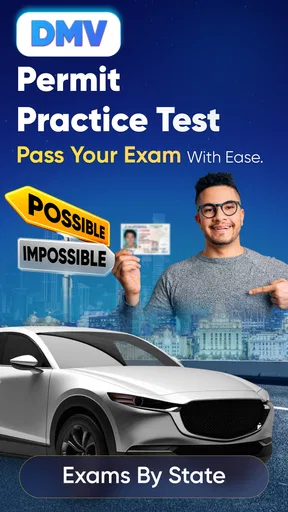
So, you’re ready to ace that driving test, huh? Well, let me introduce you to your new best friend: the DMV Permit Practice Test 2026 app. This little gem is designed to help you conquer those nerve-wracking permit exams with ease. I’ve given it a spin and here’s the scoop on how it can make your road to getting a permit a smooth ride.
Why the First Week Feels Easy
The early appeal is practical: when you have a few spare minutes, you can open a practice session instead of searching through a handbook for a place to begin. The app is an education tool from Sentinel Dev, and its focused purpose makes it less distracting than a general study app. It is free to download, with in-app purchases listed from $5.99 to $19.99 per item, so I would check what is included before paying for anything.
For a first-time learner, a useful opening routine is to take a short set of questions, note which topics feel unfamiliar, and then return to those topics rather than treating every session as a full mock exam. That approach makes practice less intimidating and helps turn a vague worry about the test into a list of things to review. The app is rated for Everyone, and it is aimed at people preparing for a permit exam rather than experienced drivers seeking advanced instruction.
Getting Started: The First Impression
Diving into the app is like slipping into the driver’s seat of a new car. It’s straightforward, sleek, and user-friendly. The moment you open the app, you’re greeted with a clean interface. No clutter, just what you need to start practicing right away. It covers a wide range of states, so whether you’re in New York or sunny California, you’re covered. The app makes it super simple to select your state and get tailored practice tests that match your specific DMV requirements.
Choosing a State and Making Practice Count
State selection is more than a setup detail for a permit test: rules, signs, and test expectations can differ by location. I would confirm that the state shown in the app matches the place where you plan to apply before trusting a score as a measure of readiness. If you move, study across state lines, or help a friend prepare somewhere else, switch the selection deliberately; otherwise, familiar-looking questions can create false confidence.
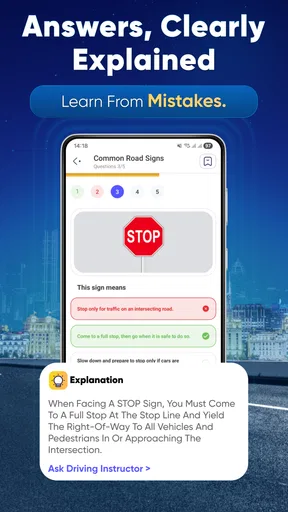
A sensible workflow is to read the explanation after every answer, including correct ones. Getting a question right by guessing is not the same as knowing the rule, and an explanation can expose that difference. I’d also keep a small list of missed concepts outside the app—such as a sign or right-of-way situation—so a later session can focus on understanding the rule instead of merely recognizing a repeated question.
Customization and Content: Tailored for You
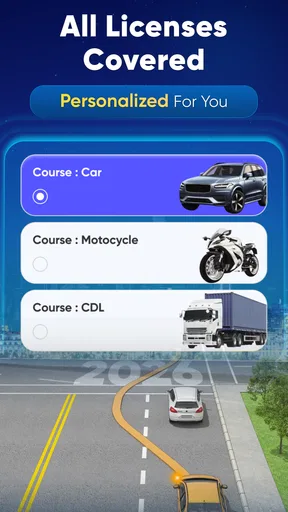
Let’s talk customization. The app lets you select different types of tests, focusing on areas where you might need a little extra practice. Not feeling confident about traffic signs? There’s a section just for that. Want to master road rules? Yep, it’s got that too. The questions are updated regularly to reflect any changes in the real tests, so you’re not practicing with outdated info. It’s like having a personal tutor in your pocket.
Worth Reading Before You Choose

EA SPORTS FC Mobile 26 Is a Bigger Football Game, but It Takes Time

Flipboard Shows What News Apps Must Do Beyond the Feed

Switching to Android Auto Means Rethinking Your Driving Routine

Google Calendar Makes a Crowded Week Easier to Manage

Ludo King Makes the Most of the Minutes Between Plans

Baby Panda World Brings Quick Play to Modern Phones, but Its Game Library Feels Busy
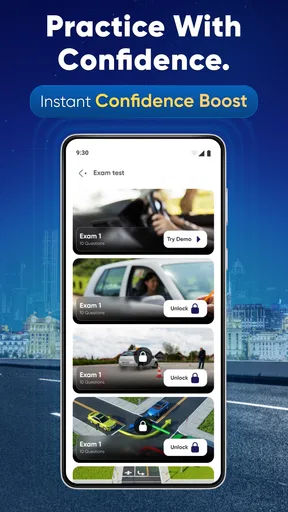
The app includes a variety of tests that mimic the actual permit exams. You’ll find everything from simple multiple-choice questions to trickier scenario-based queries. Plus, there’s an explanation for each answer, which is super handy for understanding why you got it right or wrong.
How It Fits Around a Real Schedule
Imagine studying between classes or during a lunch break: you have ten minutes, not an evening free to read every page of a manual. A brief, topic-focused session can make that gap useful. On the way to an appointment, you could review a few signs while waiting—but not while driving. I’d keep the phone put away whenever a vehicle is moving and use practice only when safely stopped.
This is where the app differs from the usual alternatives. A state handbook is better for careful reference and for checking the exact wording of local rules; a practice app is better for quick recall and spotting weak areas. I wouldn’t treat either as a replacement for the other. Use the handbook when an explanation raises a question, then return to the app to see whether you can apply the rule to a fresh prompt.
Practice Makes Perfect: Features That Shine
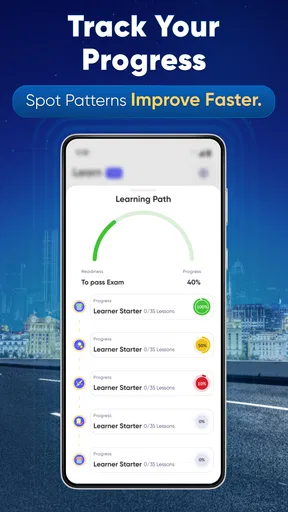
One of my favorite features is the progress tracker. It shows you how well you’re doing and where you might need to focus a bit more. It’s like a personal report card that motivates you to keep improving. You can even set reminders to practice daily, ensuring you’re consistently prepping.
Another standout feature? The app works offline. So, whether you’re on a Wi-Fi-less road trip or just chilling in a park, you can keep practicing without missing a beat. The ability to practice anywhere, anytime is a game-changer for busy schedules.
And for those moments when you need a break from serious studying, the app throws in some fun quizzes. These are perfect for testing your knowledge in a more relaxed setting, while still being informative.
Keeping the Habit Without Burning Out
A progress display is most useful when it changes what you do next. If one category remains difficult, I’d spend the next session there rather than chasing a perfect overall score. Then, after a few focused sessions, I’d mix topics again to check whether I can switch between rules without relying on a predictable sequence. This small change makes practice more diagnostic than simply repeating comfortable questions.
Reminders can help establish a routine, but daily study is not automatically better if it becomes a chore. A short session several times a week may be easier to maintain than a long cram session followed by a week away. If reminders start to feel like noise, turn the habit into a cue tied to something already in your day, such as a break after school or work. The goal is steady recall, not an impressive streak.
Offline access also has a practical trade-off: it makes studying possible when a connection is unavailable, but it should not encourage you to assume every rule is current forever. Since the app presents itself as preparation for a specific year and says its questions are updated, I would still use the local handbook as the final reference for rules and requirements. That is especially sensible if you are studying well ahead of your test or your state has recently changed a rule.
User Experience: Smooth and Seamless
Navigation is a breeze. The developers clearly put a lot of thought into making sure everything is intuitive. As someone who isn’t the most tech-savvy, I appreciated not having to fumble through a confusing menu. Everything is just a tap away.
And can we talk about speed? The app is lightning fast. There’s no lag, no waiting for screens to load. It’s all instant, which is exactly what you need when you’re diligently preparing for a test.
When the Format Helps—and When It Doesn’t
Question-and-answer practice suits learners who want active recall: you have to choose, make a mistake if necessary, and work out why. It is less suited to someone who has not yet read any basic material and expects quiz answers alone to teach every detail. If unfamiliar words or traffic situations leave you guessing, pause and consult the state’s official handbook before continuing. That extra step can prevent memorizing an answer without understanding the underlying rule.
It may also be the wrong choice for someone who wants behind-the-wheel coaching, a complete driver education course, or help with scheduling an appointment. Its role is permit-test preparation, not teaching vehicle control or replacing official DMV procedures. A learner who needs instruction in a classroom, another language, or a format better suited to their accessibility needs should compare other learning resources before settling on this one.
The app has a 4.8 average from around 16,000 ratings, with roughly 97 written reviews, and more than 500,000 installs. Those figures suggest that many learners have found it useful, but they cannot tell me whether its state-specific material fits every person’s needs. I would judge it by whether the explanations help you understand missed questions and whether the selected state matches your exam.
Wrapping Up: Final Thoughts
So, is the app worth downloading? Absolutely. It’s a comprehensive, well-designed tool that makes preparing for your permit test a breeze. The combination of tailored practice tests, a clean interface, and offline capabilities makes it a standout choice for anyone aiming to ace their DMV exam.
Whether you’re a first-time test taker or someone looking to brush up on their knowledge, this app is a trusty companion on your journey to becoming a confident driver. So go ahead, download it, and get ready to hit the road with confidence!
Does It Earn a Place Beyond the First Week?
For longer-term value, I would use it as a study companion with a clear stopping point rather than an app to keep indefinitely. Its strongest recurring use is returning to weak topics, checking whether explanations make sense, and mixing subjects as the test approaches. Once you consistently understand the rules and can answer without leaning on familiar wording, more repetitions may offer diminishing returns. At that stage, reviewing the official handbook is a better use of time than chasing a higher practice score.
The app is available free, and version 1.1.2 supports Android 8.0 and later. That makes it an accessible option for many Android users, though anyone considering an in-app purchase should decide whether the extra material solves a specific need rather than buying simply because a test date is near. The purchase range is not a reason by itself to spend; I’d first see whether the free experience supports a useful study routine.
My lasting verdict is positive with a boundary: I’d keep it installed while preparing, especially if short sessions and topic-based practice help you stay consistent. I wouldn’t rely on it as the sole authority or as a substitute for real driving instruction. Its value is clearest when it turns spare moments into focused review, then sends you back to official state material whenever a rule needs a more careful answer.
Pros
- Comprehensive question database.
- User-friendly interface design.
- Simulates real DMV test format.
- Offline mode available for practice.
- Regular updates with latest questions.
Cons
- Limited to multiple-choice format.
- No personalized progress tracking.
- Ads can be distracting.
- Requires internet for updates.
- Limited support for non-English speakers.
FAQs for DMV Permit Practice Test 2026
What is the DMV Permit Practice Test 2026 app?
The DMV Permit Practice Test 2026 app is designed to help users prepare for their driving permit exams. It offers a variety of practice questions and tests that simulate the actual DMV exam. The app is tailored to cover different states' requirements, ensuring comprehensive preparation for users across the U.S.
How accurate are the practice tests compared to the actual DMV exam?
The practice tests in the DMV Permit Practice Test 2026 app are crafted to closely resemble the actual DMV exams. They include updated questions that reflect current traffic laws and regulations. While not identical, the practice tests are highly representative and can significantly boost users' confidence and preparedness.
Does the app cover all states in the United States?
Yes, the DMV Permit Practice Test 2026 app covers all states in the U.S. It provides state-specific practice questions and tests, catering to the unique requirements and laws of each state. Users can select their state during setup to ensure they are practicing with the correct material.
Is there a cost associated with downloading or using the app?
The DMV Permit Practice Test 2026 app is free to download. However, some features or additional content might require in-app purchases. These options can enhance the learning experience, offering more detailed explanations, additional practice questions, or ad-free usage.
Can the app be used offline?
Yes, the DMV Permit Practice Test 2026 app offers offline functionality. Once downloaded, users can access practice questions and tests without an internet connection, making it convenient for studying anytime and anywhere. However, updates and additional content may require an internet connection.


